QR Code Menu for Restaurants and Cafes
Your guest scans the code on the table and your menu, with photographs, opens on their phone. Nothing to install, and you change a price without a trip to the printer.
EU legal entity · GDPR-compliant · intra-EU VAT invoicing
QR Code Menu at a glance
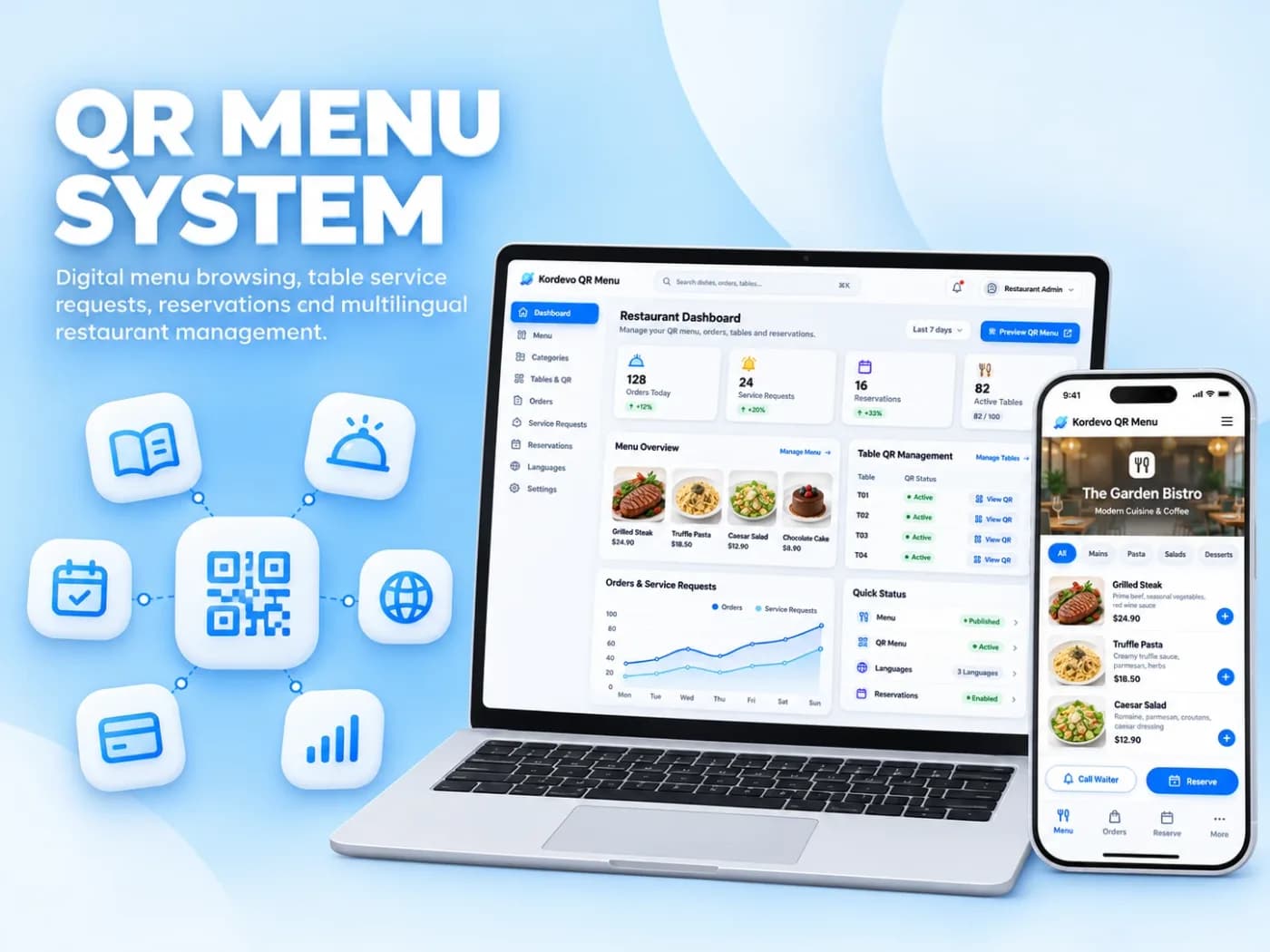
A QR code menu is a digital menu that opens when a guest scans a code placed on the table with a phone camera; nothing is installed, the menu loads straight in the browser. The venue updates prices, dishes and sold-out notices from its own panel, without reprinting anything. One code can carry the menu in several languages and show allergen details for each dish.
What the service covers
Menu in several languages
Up to four languages under one code (DE, EN, PL, TR). The guest picks a language and dish names and descriptions follow.
Allergen details per dish
Gluten, dairy, nuts and the rest can sit under each dish, with the detail a printed card never had room for.
Price and dish panel
An admin panel to change a price, add or remove a dish, flag something as sold out and publish the daily special.
Categories with photographs
Starters, mains, desserts and drinks, each dish with a photograph, a description and portion information.
Table stands and labels
Printed table stands and adhesive labels carrying the code, designed to match the look of the venue.
Links to your business profile
Links from the foot of the menu to your Google Business Profile, directions, telephone and social accounts.
Why Choose Kordevo for QR Code Menu?
The expensive part of a printed menu is not the printing, it is that it cannot change. When supplier prices rise you either absorb the loss or cross out a line by hand, and adding one dish means reprinting everything. Guests discover that something has run out only when they try to order it. A QR code menu removes all three problems: prices, dishes and availability are current within minutes.
The mechanism is simple. The guest points a phone camera at the code on the table and the menu opens in the browser. There is no app to install, no sign-up and no account to create. For venues in Germany, the Netherlands and Belgium the decisive feature is language: one code can carry the menu in up to four languages, so a local guest and a visitor each read it in their own. Allergen details can sit under every dish in as much depth as you need, because space on a card no longer sets the limit.
What we build is not a subscription to somebody else's menu platform. The menu is published under your own domain, designed to match the look of the venue and, where one exists, to speak the same visual language as your website. The menu page is set up so search engines can read it, which means a guest searching for your venue by name can land on the menu itself. If you take orders to go, a WhatsApp ordering link can sit at the foot of the menu.
The work starts when you send us a photograph or a file of your current menu. We enter the dishes, the categories and the prices, prepare the menu and show it to you before anything is published; corrections are made together. We then deliver the codes as table stands or adhesive labels. Pricing is split in two, a one-off setup fee and a monthly maintenance fee, with print work as a separate line. Once the scope is agreed you receive a written quote. For a newly opened venue, visibility in nearby searches can be planned alongside the menu with Google Ads.
Technologies We Use
Let's Get Started
The first consultation is free. Written quote within 24 hours for clearly scoped work.
Get Free QuoteOr call us now: +90 552 944 24 34
A Printed Card Against a QR Code Menu
The comparison is drawn against a printed card. Ready-made menu platforms are not included, because their terms differ from provider to provider.
Changing a price
- Printed card
- Needs reprinting
- Kordevo QR code menu
- From the panel, immediately
Number of languages
- Printed card
- A separate print run each
- Kordevo QR code menu
- One code, up to four
Allergen details
- Printed card
- Limited by space
- Kordevo QR code menu
- Per dish, no limit
Sold-out dishes
- Printed card
- Discovered when ordering
- Kordevo QR code menu
- Marked as sold out
Photographs
- Printed card
- Raise the printing cost
- Kordevo QR code menu
- A photograph on every dish
Time to update
- Printed card
- Tied to the printer's schedule
- Kordevo QR code menu
- Within minutes
What Determines the Price of a QR Code Menu
The fee is split into a one-off setup and a monthly maintenance charge, with printing as a separate line. The headings below shape both.
Number of dishes and categories
How many dishes go into the menu, and how the categories are structured, sets the build time directly. A twenty-dish cafe menu and a two-hundred-dish restaurant menu are not the same work.
Number of languages
Every additional language means dish names and descriptions written again. Because dish names are not left to machine translation, this weighs on the setup side.
Visual preparation
If you already have photographs of your dishes we edit and place them. If you do not, a shoot or image preparation is planned as separate work.
Stands and label printing
The number of tables, the material and how bespoke the design is set the print line. It stands apart from both the setup and the monthly fee.
Scope of monthly maintenance
Hosting and technical upkeep are in every package. If you want us to make the menu changes, or you plan seasonal menus, the maintenance scope is set accordingly.
Which companies benefit the most?
Restaurants and grill houses
Venues with a wide menu, where a photograph of the dish decides the order and where fewer questions for the waiter matters during the busy hours.
Cafes, patisseries and bakeries
Small venues whose daily specials, cakes and drinks change often and who would rather not visit a printer every time something moves.
Venues serving guests in several languages
Places that serve both the local neighbourhood and visitors, and want one code to carry the menu in more than one language.
Chains and venues with branches
Operators who would rather change a price or a dish once, centrally, than maintain a separate menu for every branch.
QR Code Menu: how we work
Brief
We define your needs, goals and constraints. We produce a written project summary and timeline.
Design
Wireframe and high-fidelity Figma design. Approval before development begins.
Development
Sprint-based development. You can see a working version every two weeks.
Testing
Functional tests, performance checks, mobile compatibility and SEO validation.
Launch
Live deployment, Google Search Console setup, handover of source code and accounts, then ongoing maintenance.
QR Code Menu frequently asked questions about
Common questions about our process, scope, delivery timeline and way of working.
No. The code is read by the phone's own camera and the menu opens directly in the browser. There is no app, no sign-up and no account step. Each of those steps costs you guests who give up before they ever see the menu, which is why none of them are there.
Last updated:
Where we work
We work remotely with businesses across Europe: video calls, phone and email, a written scope, weekly progress reports and a delivery date set in the contract.
Let's Talk About Your Project
The first consultation is free. For clearly scoped work, you receive a written quote within 24 hours. Tell us your idea and we'll map out the next steps.
- Written quote
- Contract-backed delivery
- English-language communication